Data Structure
Understand how categories, types, assets, and locations relate to each other in batapp.
Data Structure
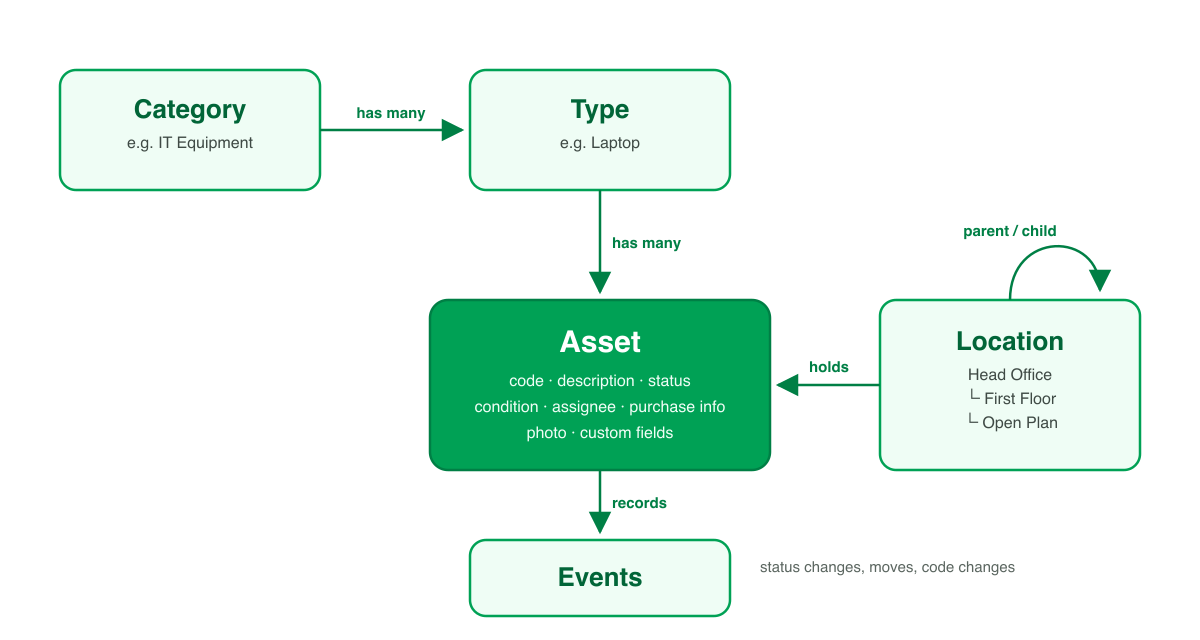
batapp organises assets in a simple hierarchy: Category → Type → Asset. Assets are also assigned to Locations, which have their own hierarchy.
Category → Type → Asset
Every asset must belong to a type, and every type must belong to a category.
Category: IT Equipment
├── Type: Laptop
│   ├── Asset: IT-001 (Dell Latitude 5540)
│   └── Asset: IT-002 (MacBook Pro 14")
├── Type: Desktop
│   └── Asset: IT-003 (HP EliteDesk 800)
└── Type: Monitor
    ├── Asset: IT-004 (Dell U2723QE)
    └── Asset: IT-005 (LG 27UK850)

Category: Furniture
├── Type: Desk
│   └── Asset: FN-001 (Standing Desk)
└── Type: Chair
    └── Asset: FN-002 (Ergonomic Office Chair)
- Categories are broad groupings. Most organisations have 5–10 categories.
- Types are specific kinds of assets within a category. You'll have many more types than categories.
- Assets are individual tracked items. Each asset has a unique code.
When you add an asset, you select a type — the category is determined automatically from the type.
Locations
Locations represent where assets physically are. They support a hierarchy through parent–child relationships:
Head Office
├── Floor 1
│   ├── Reception
│   └── Meeting Room A
└── Floor 2
    ├── Open Plan
    └── Server Room

Warehouse
└── Bay 3
Each location has a path that's built automatically from the hierarchy (e.g. Head Office / Floor 2 / Server Room).
Location Types
Locations are one of two types:
- Asset location — Can have assets assigned to it. Has a code. These are the locations you'll select when adding or moving assets.
- Grouping location — Organisational only. Used to build the hierarchy (e.g. Head Office might be a grouping, while Reception is an asset location).
Planning Tips
- Keep it practical — Mirror your physical layout. Don't create locations you won't use.
- Use grouping locations for buildings or floors that don't directly hold assets.
- Codes matter — Asset location codes appear in reports and exports. Choose meaningful codes (e.g.
HO-F2-SRfor Head Office Floor 2 Server Room). - You can restructure later — Locations can be reparented, so don't worry about getting it perfect on day one.
How It All Fits Together
| Entity | Belongs to | Has many |
|---|---|---|
| Category | Organisation | Types |
| Type | Category | Assets |
| Asset | Type + Location | Events |
| Location | Parent location (optional) | Child locations, Assets |
Every asset in your register has a category (via its type), a location, a status, and optionally a condition, assignee, purchase information, photos, and custom field values.